Last updated: October 19, 2026
Many Punjab government jobs, including PERA, Rescue 1122 and the Khud-Mukhtar trainer posts, ask you to apply through the Punjab Job Portal (jobs.punjab.gov.pk). One wrong entry can cost you the post, because applications cannot be changed after you submit. This guide follows the portal’s own FAQ.
Please note: We are not the Punjab government. This guide summarises the portal’s FAQ page. The FAQ does not list application fees, required documents or a phone helpline, so read each job advertisement for those.
Step 1: Create Your Account
- Click Register at the top right of the portal.
- Enter a valid email address and set a password.
- Open the activation link sent to your email, then log in.
Use an email you check daily. Updates about your application come by email and text message.
Step 2: Complete the Profile Builder
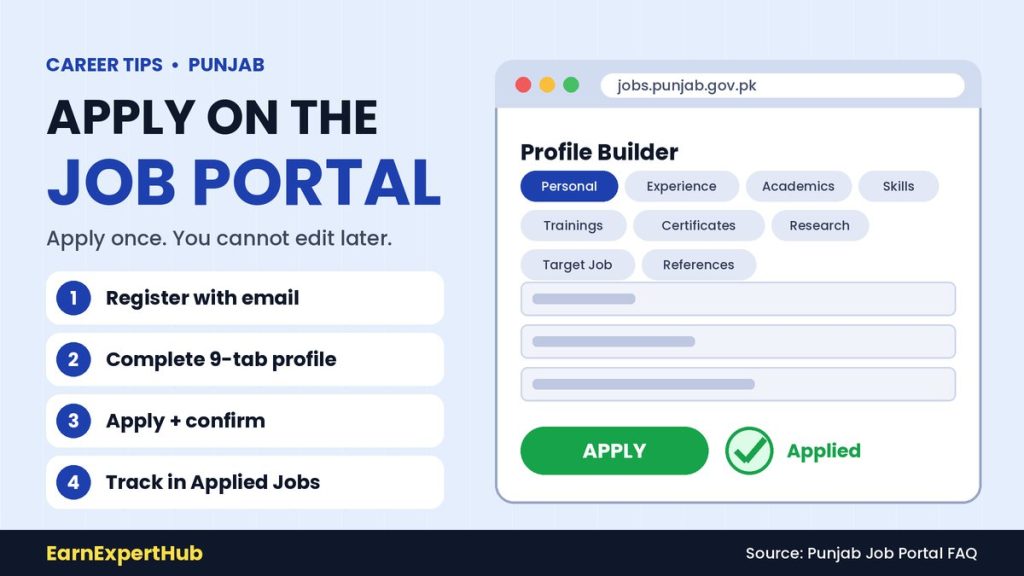
The profile has nine tabs: Personal Information, Experience, Academics, Skills, Trainings, Certifications, Research Work, Target Job and References.
- Save Personal Information with the save button.
- For other tabs, use the add button, fill the pop-up and click save and continue.
- To fix an entry, use the update icon in the action column, edit it and click submit.
- The portal says to keep your information true and accurate at all times.
An incomplete or outdated profile can stop you from applying. Our documents checklist helps you keep details ready.
Step 3: Add a Profile Photo
Use the change picture button on your profile page. The maximum file size is 4 MB.
Step 4: Find and Apply
- Search jobs using filters: department, district, industry, type of contract and career level.
- Open the job details and read the full advertisement, including qualification and last date.
- Click Apply, enter your current and expected salary and any disability information, then submit.
- A green pop-up confirms the application, and you get an email and text message.
You can apply only once for a job, and the FAQ says to apply only for jobs that match your profile. Applications cannot be changed after submission, so review them carefully first.
Step 5: Track Your Application
- Open Applied Jobs to see your applications and their submission dates.
- Stages are job applied, shortlisting, interview, selection and rejection (if not verified), and you are told by email and text.
- Hiring usually starts after the posting expires. Shortlisted candidates are contacted within one month of the position’s expiry date.
Set Job Alerts
In the Target Job tab, set your preferred job title, career level and salary. Matching alerts are sent to your email. You can also save jobs to apply later.
Mistakes to Avoid
- Applying on the last day. The portal can be busy near the deadline.
- A name, CNIC or date of birth that does not match your documents.
- Applying for a post you do not qualify for.
- Paying anyone to “confirm” your application. See our guide on fake job offers.
- Ignoring emails and text messages from the portal.
Frequently Asked Questions
Can I edit my application after I submit it?
No. The portal says applications cannot be changed after submission.
Can I apply twice for the same job?
No. You can apply only once.
How big can my profile photo be?
Up to 4 MB, according to the FAQ.
Where can I report a portal problem?
The FAQ lists jobsonlinesupport@punjab.gov.pk for email issues.
When will I hear back?
Shortlisted candidates are contacted within one month of the position’s expiry date, according to the FAQ.
Final Words
Treat the portal like an exam: fill your profile early, double-check every entry and apply before the last day. Then read our application letter samples and CV guide for interviews. For more career tips in Pakistan, keep visiting EarnExpertHub.
Source: Punjab Job Portal, FAQ.
Get the latest jobs and government schemes every day. Join our WhatsApp channel.
Join Our Channel